My Setup
Small things I've built or tuned to make research and remote robotics development smoother, from a menu-bar gauge for my AI usage to a one-command tunnel into the lab. I keep refining these; check back.
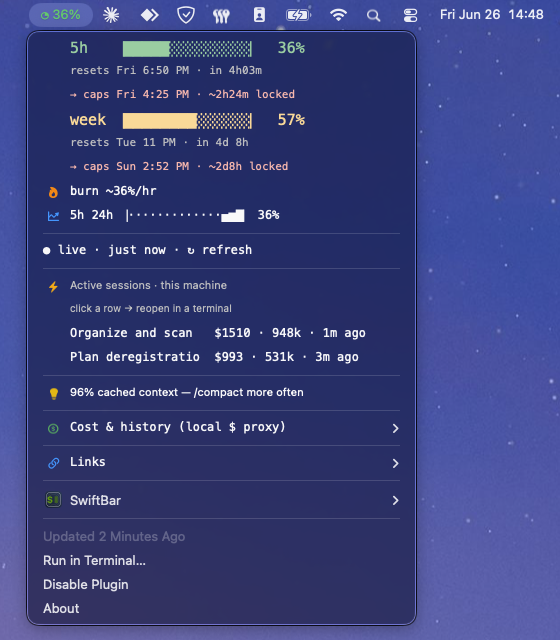
claude-meter open source
A macOS menu-bar gauge for my Claude Code usage: live 5-hour & weekly rate-limit %, burn rate, projected exhaustion, desktop alerts, and a local cost breakdown. SwiftBar + one dependency-free Python file, reading the rate-limit headers Anthropic returns.
claude-mac-bridge open source
A set of Claude Code skills that let my AI assistant read and manage my
Apple Calendar, Mail and Reminders through native AppleScript, entirely on-device,
with no cloud connectors. One command (/plan-day) pulls together an
overnight mail recap, the day's schedule with its open gaps, and a ranked todo list; companion
skills triage the inbox (read & flag only) and reconcile deadlines against free time.
Built with Claude and MIT-licensed. It runs locally with full access to those apps, so install it only if you are comfortable letting an LLM read and act on your data. See the README before using.
One-command lab tunnel
mosh + tmux + ZeroTier: a single cz alias drops me into a persistent
tmux session on the lab workstations over a roaming, low-latency link that survives sleep, Wi-Fi changes
and flaky coffee-shop networks. Long training runs keep going; I just reattach.
Warp + zsh
My daily-driver terminal: blocks, launch configs and a tuned .zshrc for fast
SSH/tmux work. My tmux config and the lab-tunnel aliases live in my
dotfiles.
The cz lab-tunnel aliases (mosh + tmux + ZeroTier), an SSH host template, and my
no-plugin .tmux.conf with a dependency-free hostname banner. Lab specifics are
replaced with placeholders, so anyone can drop in their own host and go.